

Monte Carlo class usage#
This is an advanced use of RocketPy. This notebook runs a Monte Carlo analysis and predicts probability distributions of the rocket’s landing point, apogee and other relevant information.
The MonteCarlo class simplifies the process of performing Monte Carlo simulations. The idea is to take the already defined classes for a standard flight simulation, and create the so called Stochastic classes, which are used to run the Monte Carlo analysis.
This class offers extensive capabilities, and this example notebook covers as many as possible. For a deeper understanding, we recommend checking the class documentation.
For a more comprehensive conceptual understanding of Monte Carlo Simulations, refer to RocketPy’s main reference: RocketPy: Six Degree-of-Freedom Rocket Trajectory Simulator.
[1]:
# We import these lines for debugging purposes, only works on Jupyter Notebook
%load_ext autoreload
%autoreload 2
First, let’s import the necessary libraries
[2]:
import datetime

from rocketpy import Environment, Flight, Function, MonteCarlo, Rocket, SolidMotor
from rocketpy.stochastic import (
    StochasticEnvironment,
    StochasticFlight,
    StochasticNoseCone,
    StochasticParachute,
    StochasticRailButtons,
    StochasticRocket,
    StochasticSolidMotor,
    StochasticTail,
    StochasticTrapezoidalFins,
)
If you are using Jupyter Notebooks, it is recommended to run the following line to make matplotlib plots which will be shown later interactive and higher quality.
[3]:
%matplotlib widget
Step 1: Standard Simulation#
We will first create a standard RocketPy simulation objects (e.g. Environment, SolidMotor, etc.) to then create the Stochastic objects.
The standard objects created here are the same as in the First Simulation Page of our documentation, so you can go through that if you want to understand what is done in more detail.
The only difference here is that we will use a Environment with atmospheric model type Ensemble. This allows us to run the Monte Carlo analysis with different ensemble members, which are different atmospheric profiles.
We will do it all in one single cell for simplicity.
[4]:
# Environment
env = Environment(latitude=39.389700, longitude=-8.288964, elevation=113)
tomorrow = datetime.date.today() + datetime.timedelta(days=1)
env.set_date((tomorrow.year, tomorrow.month, tomorrow.day, 12))
env.set_atmospheric_model(type="Ensemble", file="GEFS")

# Motor
motor = SolidMotor(
    thrust_source="../../../data/motors/cesaroni/Cesaroni_M1670.eng",
    dry_mass=1.815,
    dry_inertia=(0.125, 0.125, 0.002),
    nozzle_radius=33 / 1000,
    grain_number=5,
    grain_density=1815,
    grain_outer_radius=33 / 1000,
    grain_initial_inner_radius=15 / 1000,
    grain_initial_height=120 / 1000,
    grain_separation=5 / 1000,
    grains_center_of_mass_position=0.397,
    center_of_dry_mass_position=0.317,
    nozzle_position=0,
    burn_time=3.9,
    throat_radius=11 / 1000,
    coordinate_system_orientation="nozzle_to_combustion_chamber",
)
print(f"Total Impulse of the Solid Motor: {motor.total_impulse} Ns")

# Rocket
rocket = Rocket(
    radius=127 / 2000,
    mass=14.426,
    inertia=(6.321, 6.321, 0.034),
    power_off_drag="../../../data/rockets/calisto/powerOffDragCurve.csv",
    power_on_drag="../../../data/rockets/calisto/powerOnDragCurve.csv",
    center_of_mass_without_motor=0,
    coordinate_system_orientation="tail_to_nose",
)

rail_buttons = rocket.set_rail_buttons(
    upper_button_position=0.0818,
    lower_button_position=-0.618,
    angular_position=45,
)

rocket.add_motor(motor, position=-1.255)

nose_cone = rocket.add_nose(length=0.55829, kind="vonKarman", position=1.278)

fin_set = rocket.add_trapezoidal_fins(
    n=4,
    root_chord=0.120,
    tip_chord=0.060,
    span=0.110,
    position=-1.04956,
    cant_angle=0.5,
    airfoil=("../../../data/airfoils/NACA0012-radians.txt", "radians"),
)

tail = rocket.add_tail(
    top_radius=0.0635, bottom_radius=0.0435, length=0.060, position=-1.194656
)
Main = rocket.add_parachute(
    "Main",
    cd_s=10.0,
    trigger=800,
    sampling_rate=105,
    lag=1.5,
    noise=(0, 8.3, 0.5),
)

Drogue = rocket.add_parachute(
    "Drogue",
    cd_s=1.0,
    trigger="apogee",
    sampling_rate=105,
    lag=1.5,
    noise=(0, 8.3, 0.5),
)

# Flight
test_flight = Flight(
    rocket=rocket,
    environment=env,
    rail_length=5,
    inclination=84,
    heading=133,
)
Total Impulse of the Solid Motor: 6026.35 Ns
Lets check the trajectory of the Flight.
[5]:
# test_flight.plots.trajectory_3d()
The flight trajectory above represents the nominal trajectory of the rocket, without any uncertainties.
Step 2: Stochastic Objects#
For each RocketPy object, we will create a Stochastic counterpart that extends the initial model, allowing us to define the uncertainties of each input parameter.
Please refer to the Working with Stochastic Objects page on RocketPy`s documentation for a more detailed explanation.
Stochastic Environment#
Starting with the Environment object, we will create a StochasticEnvironment to specify its uncertainties.
In this first example, we will specify the ensemble member and wind velocities factor.
Since the ensemble member is a discrete value, only list type inputs are permitted. The list will contain the ensemble numbers to be randomly selected during the Monte Carlo simulation. This means that in each iteration, a different ensemble member will be chosen.
[6]:
stochastic_env = StochasticEnvironment(
    environment=env,
    ensemble_member=list(range(env.num_ensemble_members)),
)

stochastic_env.visualize_attributes()
Reporting the attributes of the `StochasticEnvironment` object:

Constant Attributes:
        datum                    SIRGAS2000
        elevation                113
        gravity                  Function from R1 to R1 : (height (m)) → (gravity (m/s²))
        latitude                 39.3897
        longitude                -8.288964
        timezone                 UTC

Stochastic Attributes:
        wind_velocity_x_factor   1.00000 ± 0.00000 (normal)
        wind_velocity_y_factor   1.00000 ± 0.00000 (normal)

Stochastic Attributes with choice of values:
        ensemble_member [0, 1, 2, 3, 4, 5, 6, 7, 8, 9, 10, 11, 12, 13, 14, 15, 16, 17, 18, 19, 20, 21, 22, 23, 24, 25, 26, 27, 28, 29, 30]
NOTE#
Always check the .visualize_attributes() method of each stochastic object to verify the uncertainties were correctly set.
Just to illustrate the potential of this technique, let’s randomly generate 5 instances of the environment using the create_object method.
For each instance, we will calculate the wind speed at 1km altitude and store the results in a list.
[7]:
wind_speed_at_1000m = []
for i in range(5):
    rnd_env = stochastic_env.create_object()
    wind_speed_at_1000m.append(rnd_env.wind_velocity_x(1000))

print(wind_speed_at_1000m)
[np.float64(5.6160475545638056), np.float64(4.980393173814939), np.float64(5.385767484040212), np.float64(7.4369921935345875), np.float64(7.816424882152167)]
As you can see, the wind speed varies between ensemble members. This demonstrates how the Monte Carlo simulation can capture the variability in wind conditions due to different ensemble members.
Motor#
We can now create a StochasticSolidMotor object to define the uncertainties associated with the motor. In this example, we will apply more complex uncertainties to the motor parameters.
The StochasticSolidMotor also has one special parameter which is the total_impulse. It lets us alter the total impulse of the motor while maintaining the thrust curve shape. This is particularly useful for motor uncertainties.
[9]:
stochastic_motor = StochasticSolidMotor(
    solid_motor=motor,
    burn_start_time=(0, 0.1, "binomial"),
    grains_center_of_mass_position=0.001,
    grain_density=50,
    grain_separation=1 / 1000,
    grain_initial_height=1 / 1000,
    grain_initial_inner_radius=0.375 / 1000,
    grain_outer_radius=0.375 / 1000,
    total_impulse=(6500, 1000),
    throat_radius=0.5 / 1000,
    nozzle_radius=0.5 / 1000,
    nozzle_position=0.001,
)
stochastic_motor.visualize_attributes()
Reporting the attributes of the `StochasticSolidMotor` object:

Constant Attributes:
        burn_out_time                    3.9
        center_of_dry_mass_position      0.317
        coordinate_system_orientation    nozzle_to_combustion_chamber
        dry_I_11                         0.125
        dry_I_12                         0
        dry_I_13                         0
        dry_I_22                         0.125
        dry_I_23                         0
        dry_I_33                         0.002
        dry_mass                         1.815
        grain_number                     5
        interpolate                      linear
        thrust_source                    [[0, 0], [0.055, 100.0], [0.092, 1500.0], [0.1, 2000.0], [0.15, 2200.0], [0.2, 1800.0], [0.5, 1950.0], [1.0, 2034.0], [1.5, 2000.0], [2.0, 1900.0], [2.5, 1760.0], [2.9, 1700.0], [3.0, 1650.0], [3.3, 530.0], [3.4, 350.0], [3.9, 0.0]]

Stochastic Attributes:
        burn_start_time                  0.00000 ± 0.10000 (binomial)
        grain_density                    1815.00000 ± 50.00000 (normal)
        grain_initial_height             0.12000 ± 0.00100 (normal)
        grain_initial_inner_radius       0.01500 ± 0.00038 (normal)
        grain_outer_radius               0.03300 ± 0.00038 (normal)
        grain_separation                 0.00500 ± 0.00100 (normal)
        grains_center_of_mass_position   0.39700 ± 0.00100 (normal)
        nozzle_position                  0.00000 ± 0.00100 (normal)
        nozzle_radius                    0.03300 ± 0.00050 (normal)
        throat_radius                    0.01100 ± 0.00050 (normal)
        total_impulse                    6500.00000 ± 1000.00000 (normal)
NOTE#
Pay special attention to how different input types are interpreted in the StochasticSolidMotor object by checking the printed object:
burn_start_timewas given as a tuple of 3 items, specifying the nominal value, the standard deviation and the distribution typetotal_impulsewas given as a tuple of 2 numbers, so the distribution type was set to the default:normalAll other values set for the other parameters in the constructor are simple values, which means they are interpreted as standard deviation and the nominal value is taken from the
motorThe remaining parameters that are printed are just the nominal values from the
motor. In theStochasticobject they are saved as a list of one item
Once again, we can illustrate the power of stochastic modeling by generating multiple instances of the SolidMotor class using the StochasticSolidMotor object. For each instance, we will calculate the total impulse and store the results in a list. This will show how the uncertainties in the motor parameters affect the total impulse over multiple iterations.
[10]:
total_impulse = []
for i in range(5):
    rnd_motor = stochastic_motor.create_object()
    total_impulse.append(rnd_motor.total_impulse)

print(total_impulse)
[np.float64(3897.2472513392745), np.float64(7638.837490686001), np.float64(6424.245649353455), np.float64(7380.054043426244), np.float64(4962.403470127441)]
Rocket#
We can now create a StochasticRocket object to define the uncertainties associated with the rocket.
[11]:
stochastic_rocket = StochasticRocket(
    rocket=rocket,
    radius=0.0127 / 2000,
    mass=(15.426, 0.5, "normal"),
    inertia_11=(6.321, 0),
    inertia_22=0.01,
    inertia_33=0.01,
    center_of_mass_without_motor=0,
)
stochastic_rocket.visualize_attributes()
Reporting the attributes of the `StochasticRocket` object:

Constant Attributes:
        I_12_without_motor              0
        I_13_without_motor              0
        I_23_without_motor              0
        coordinate_system_orientation   tail_to_nose
        power_off_drag                  Function from R1 to R1 : (Mach Number) → (Drag Coefficient with Power Off)
        power_on_drag                   Function from R1 to R1 : (Mach Number) → (Drag Coefficient with Power On)

Stochastic Attributes:
        I_11_without_motor              6.32100 ± 0.00000 (normal)
        I_22_without_motor              6.32100 ± 0.01000 (normal)
        I_33_without_motor              0.03400 ± 0.01000 (normal)
        center_of_mass_without_motor    0.00000 ± 0.00000 (normal)
        mass                            15.42600 ± 0.50000 (normal)
        power_off_drag_factor           1.00000 ± 0.00000 (normal)
        power_on_drag_factor            1.00000 ± 0.00000 (normal)
        radius                          0.06350 ± 0.00001 (normal)
The StochasticRocket still needs to have its aerodynamic surfaces and parachutes added.
We can also create stochastic models for each aerodynamic surface, although this is not mandatory.
[12]:
stochastic_nose_cone = StochasticNoseCone(
    nosecone=nose_cone,
    length=0.001,
)

stochastic_fin_set = StochasticTrapezoidalFins(
    trapezoidal_fins=fin_set,
    root_chord=0.0005,
    tip_chord=0.0005,
    span=0.0005,
)

stochastic_tail = StochasticTail(
    tail=tail,
    top_radius=0.001,
    bottom_radius=0.001,
    length=0.001,
)

stochastic_rail_buttons = StochasticRailButtons(
    rail_buttons=rail_buttons, buttons_distance=0.001
)

stochastic_main = StochasticParachute(
    parachute=Main,
    cd_s=0.1,
    lag=0.1,
)

stochastic_drogue = StochasticParachute(
    parachute=Drogue,
    cd_s=0.07,
    lag=0.2,
)
Then we must add them to our stochastic rocket, much like we do in the normal Rocket.
[13]:
stochastic_rocket.add_motor(stochastic_motor, position=0.001)
stochastic_rocket.add_nose(stochastic_nose_cone, position=(1.134, 0.001))
stochastic_rocket.add_trapezoidal_fins(stochastic_fin_set, position=(0.001, "normal"))
stochastic_rocket.add_tail(stochastic_tail)
stochastic_rocket.set_rail_buttons(
    stochastic_rail_buttons, lower_button_position=(0.001, "normal")
)
stochastic_rocket.add_parachute(stochastic_main)
stochastic_rocket.add_parachute(stochastic_drogue)
NOTE#
The position arguments behave just like the other Stochastic classes parameters
Now lets check how the StochasticRocket handled all these additions
[14]:
stochastic_rocket.visualize_attributes()
Reporting the attributes of the `StochasticRocket` object:

Constant Attributes:
        I_12_without_motor              0
        I_13_without_motor              0
        I_23_without_motor              0
        coordinate_system_orientation   tail_to_nose
        power_off_drag                  Function from R1 to R1 : (Mach Number) → (Drag Coefficient with Power Off)
        power_on_drag                   Function from R1 to R1 : (Mach Number) → (Drag Coefficient with Power On)

Stochastic Attributes:
        I_11_without_motor              6.32100 ± 0.00000 (normal)
        I_22_without_motor              6.32100 ± 0.01000 (normal)
        I_33_without_motor              0.03400 ± 0.01000 (normal)
        center_of_mass_without_motor    0.00000 ± 0.00000 (normal)
        mass                            15.42600 ± 0.50000 (normal)
        power_off_drag_factor           1.00000 ± 0.00000 (normal)
        power_on_drag_factor            1.00000 ± 0.00000 (normal)
        radius                          0.06350 ± 0.00001 (normal)
Flight#
After defining the Flight, we can create the corresponding Stochastic object to define the uncertainties of the input parameters.
[15]:
stochastic_flight = StochasticFlight(
    flight=test_flight,
    inclination=(84.7, 1),  # mean= 84.7, std=1
    heading=(53, 2),  # mean= 53, std=2
)
stochastic_flight.visualize_attributes()
Reporting the attributes of the `StochasticFlight` object:

Constant Attributes:
        rail_length           5

Stochastic Attributes:
        heading               53.00000 ± 2.00000 (normal)
        inclination           84.70000 ± 1.00000 (normal)
Step 2: Starting the Monte Carlo Simulations#
First, let’s invoke the MonteCarlo class, we are going to need a filename to initialize it. The filename will be used either to save the results of the simulations or to load them from a previous ran simulation.
[16]:
test_dispersion = MonteCarlo(
    filename="monte_carlo_analysis_outputs/monte_carlo_class_example",
    environment=stochastic_env,
    rocket=stochastic_rocket,
    flight=stochastic_flight,
)
The following input file was imported: monte_carlo_analysis_outputs\monte_carlo_class_example.inputs.txt
A total of 1000 simulations results were loaded from the following output file: monte_carlo_analysis_outputs\monte_carlo_class_example.outputs.txt

The following error file was imported: monte_carlo_analysis_outputs\monte_carlo_class_example.errors.txt
C:\Users\admin\Desktop\RocketPy\rocketpy\simulation\monte_carlo.py:138: UserWarning: This class is still under testing and some attributes may be changed in next versions
  warnings.warn(
Finally, let’s simulate our flights. We can run the simulations using the method MonteCarlo.simulate().
Set append=False to overwrite the previous results, or append=True to add the new results to the previous ones.
[17]:
test_dispersion.simulate(
    number_of_simulations=1000,
    append=False,
    include_function_data=False,
    parallel=True,
    n_workers=4,
)
Starting Monte Carlo analysis
Running Monte Carlo simulation with 4 workers.
Results saved to monte_carlo_analysis_outputs\monte_carlo_class_example.outputs.txt
Alternatively, we can target an attribute using the method MonteCarlo.simulate_convergence() such that when the tolerance is met, the flight simulations would terminate early.
[ ]:
test_dispersion.simulate_convergence(
    target_attribute="apogee_time",
    target_confidence=0.95,
    tolerance=0.5,  # in seconds
    max_simulations=1000,
    batch_size=50,
)
Visualizing the results#
Now we finally have the results of our Monte Carlo simulations loaded! Let’s play with them.
First, we can print numerical information regarding the results of the simulations.
[18]:
# You only need to import results if you did not run the simulations
# test_dispersion.import_results()
[19]:
test_dispersion.num_of_loaded_sims
[19]:
1000
[20]:
test_dispersion.prints.all()
Monte Carlo Simulation by RocketPy
Data Source:  monte_carlo_analysis_outputs\monte_carlo_class_example
Number of simulations:  1000
Results:

                Parameter            Mean          Median       Std. Dev.    95% PI Lower    95% PI Upper
--------------------------------------------------------------------------------------------------------------
                 apogee_y         134.982         130.025         100.615         -47.049         356.129
     frontal_surface_wind           3.702           3.754           0.805           2.245           5.442
                   apogee        3388.888        3448.481         612.972        2017.330        4401.488
                 x_impact        2031.702        2034.583         463.765        1102.537        2895.557
     out_of_rail_velocity          25.755          25.877           2.201          20.955          29.861
              apogee_time          25.492          25.814           2.042          20.554          28.399
                  t_final         305.905         309.231          34.430         227.323         362.786
out_of_rail_stability_margin           2.673           2.669           0.079           2.524           2.830
         out_of_rail_time           0.360           0.356           0.027           0.318           0.424
     lateral_surface_wind           0.362           0.405           0.591          -0.874           1.387
                 apogee_x         248.848         244.031         135.160          12.068         528.276
                 y_impact         614.070         622.436         189.047         214.816         976.160
          impact_velocity          -5.292          -5.292           0.084          -5.448          -5.133
          max_mach_number           0.853           0.860           0.131           0.573           1.098
 initial_stability_margin           2.600           2.598           0.080           2.450           2.758
                    index         499.500         499.500         288.675          24.975         974.025
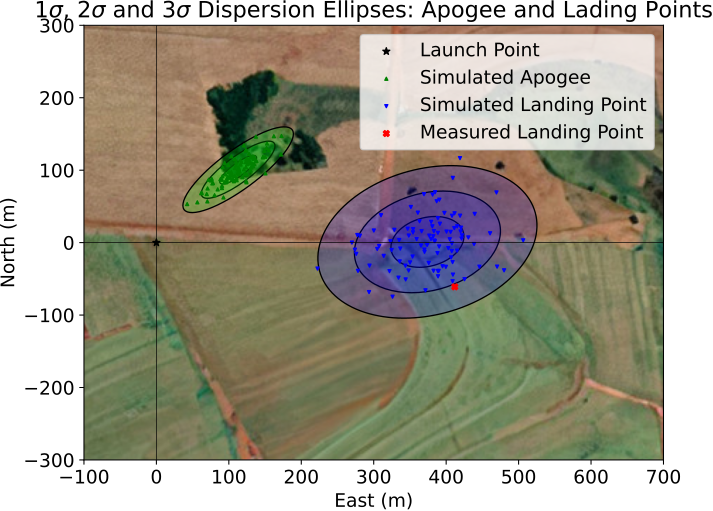
Secondly, we can plot the results of the simulations.
[21]:
test_dispersion.plots.ellipses(xlim=(-200, 3500), ylim=(-200, 3500))
Using Background Maps#
You can also use the background parameter to automatically download and display a background map. The background parameter accepts:
"satellite"- uses Esri.WorldImagery for satellite imagery"street"- uses OpenStreetMap.Mapnik for street maps"terrain"- uses Esri.WorldTopoMap for terrain mapsAny contextily provider name (e.g.,
"CartoDB.Positron")
Note that if both image and background parameters are provided, the image parameter takes precedence. The background map is automatically downloaded based on the environment’s latitude and longitude coordinates.
Note on Python 3.14 Support: Currently, the
backgroundfeature is automatically enabled only for Python 3.13 and lower. This is due to the lack of pre-built binary wheels forrasterio(a core dependency) on Python 3.14 (see rasterio issue #3419).Advanced Users: If you are using Python 3.14 and are comfortable compiling C-extensions from source (e.g., setting up a GDAL environment), you can manually install
contextily. Once installed, this feature will become available.
[22]:
# Example: Plot ellipses with satellite background map
test_dispersion.plots.ellipses(
    background="satellite", xlim=(-200, 3500), ylim=(-200, 3500)
)
[23]:
# Example: Plot ellipses with street map background
test_dispersion.plots.ellipses(
    background="street", xlim=(-200, 3500), ylim=(-200, 3500)
)
[24]:
test_dispersion.plots.all()
Finally, one may also export the ellipses to a .kml file so it can be easily visualized in Google Earth
[24]:
test_dispersion.export_ellipses_to_kml(
    filename="monte_carlo_analysis_outputs/monte_carlo_class_example.kml",
    origin_lat=env.latitude,
    origin_lon=env.longitude,
    type="impact",
)
c:\Users\admin\Desktop\RocketPy\venv\Lib\site-packages\numpy\lib\_function_base_impl.py:571: RuntimeWarning: Mean of empty slice.
  avg = a.mean(axis, **keepdims_kw)
c:\Users\admin\Desktop\RocketPy\venv\Lib\site-packages\numpy\_core\_methods.py:136: RuntimeWarning: invalid value encountered in divide
  ret = um.true_divide(
C:\Users\admin\Desktop\RocketPy\rocketpy\tools.py:590: RuntimeWarning: Degrees of freedom <= 0 for slice
  covariance_matrix = np.cov(list_x, list_y)
c:\Users\admin\Desktop\RocketPy\venv\Lib\site-packages\numpy\lib\_function_base_impl.py:2914: RuntimeWarning: divide by zero encountered in divide
  c *= np.true_divide(1, fact)
c:\Users\admin\Desktop\RocketPy\venv\Lib\site-packages\numpy\lib\_function_base_impl.py:2914: RuntimeWarning: invalid value encountered in multiply
  c *= np.true_divide(1, fact)
c:\Users\admin\Desktop\RocketPy\venv\Lib\site-packages\numpy\_core\fromnumeric.py:3860: RuntimeWarning: Mean of empty slice.
  return _methods._mean(a, axis=axis, dtype=dtype,
c:\Users\admin\Desktop\RocketPy\venv\Lib\site-packages\numpy\_core\_methods.py:144: RuntimeWarning: invalid value encountered in scalar divide
  ret = ret.dtype.type(ret / rcount)
Custom exports using callback functions#
We have shown, so far, how to perform to use the MonteCarlo class and visualize its results. By default, some variables exported to the output files, such as apogee and x_impact. The export_list argument provides a simplified way for the user to export additional variables listed in the documentation, such as inclination and heading.
There are applications in which you might need to extract more information in the results than the export_list argument can handle. To that end, the MonteCarlo class has a data_collector argument which allows you customize further the output of the simulation.
To exemplify its use, we show how to export the date of the environment used in the simulation together with the average reynolds number along with the default variables.
We will use the stochastic_env, stochastic_rocket and stochastic_flight objects previously defined, and only change the MonteCarlo object. First, we need to define our customized data collector.
[25]:
import numpy as np


# Defining custom callback functions
def get_average_reynolds_number(flight):
    reynold_number_list = flight.reynolds_number(flight.time)
    average_reynolds_number = np.mean(reynold_number_list)
    return average_reynolds_number


def get_date(flight):
    return flight.env.date


custom_data_collector = {
    "average_reynolds_number": get_average_reynolds_number,
    "date": get_date,
}
The data_collector must be a dictionary whose keys are the names of the variables we want to export and the values are callback functions (python callables) that compute these variable values. Notice how we can compute complex expressions in this function and just export the result. For instance, the get_average_reynolds_number calls the flight.reynolds_number method for each value in flight.time list and computes the average value using numpy’s mean. The date variable is
straightforward.
After we define the data collector, we pass it as an argument to the MonteCarlo class.
[26]:
test_dispersion = MonteCarlo(
    filename="monte_carlo_analysis_outputs/monte_carlo_class_example_customized",
    environment=stochastic_env,
    rocket=stochastic_rocket,
    flight=stochastic_flight,
    export_list=["apogee", "apogee_time", "x_impact"],
    data_collector=custom_data_collector,
)
The following input file was imported: monte_carlo_analysis_outputs\monte_carlo_class_example_customized.inputs.txt
A total of 0 simulations results were loaded from the following output file: monte_carlo_analysis_outputs\monte_carlo_class_example_customized.outputs.txt

The following error file was imported: monte_carlo_analysis_outputs\monte_carlo_class_example_customized.errors.txt
C:\Users\admin\Desktop\RocketPy\rocketpy\simulation\monte_carlo.py:138: UserWarning: This class is still under testing and some attributes may be changed in next versions
  warnings.warn(
[27]:
test_dispersion.simulate(number_of_simulations=10, append=False)
Starting Monte Carlo analysis
Iterations completed: 000010 | Average Time per Iteration: 0.449 s | Estimated time left: 0 s
Completed 10 iterations. In total, 10 simulations are exported.
Total wall time: 4.5 s
Results saved to monte_carlo_analysis_outputs\monte_carlo_class_example_customized.outputs.txt
[28]:
test_dispersion.prints.all()
Monte Carlo Simulation by RocketPy
Data Source:  monte_carlo_analysis_outputs\monte_carlo_class_example_customized
Number of simulations:  10
Results:

                Parameter            Mean          Median       Std. Dev.    95% PI Lower    95% PI Upper
--------------------------------------------------------------------------------------------------------------
                   apogee        3238.512        3238.136         777.943        1999.052        4267.947
              apogee_time          24.875          25.060           2.608          20.379          28.010
                 x_impact        1994.748        1855.935         596.286        1091.269        2859.472
                    index           5.500           5.500           2.872           1.225           9.775
  average_reynolds_number     1057974.328     1076980.672      191947.145      741972.395     1301327.838
                     date         513.750          12.000         872.524           6.000        2025.000