

Custom Atmosphere#
The user can also set a completely customized atmosphere. This is particularly useful for setting custom values of wind in both directions.
First, we initialize a new Environment.
from rocketpy import Environment

env_custom_atm = Environment()
Then, we set the atmospheric model as custom_atmosphere and assign 4 different
profiles to the pressure, temperature, wind U and wind V fields.
Let’s see how it’s done.
env_custom_atm.set_atmospheric_model(
    type="custom_atmosphere",
    pressure=None,
    temperature=300,
    wind_u=[
        (0, 5), # 5 m/s at 0 m
        (1000, 10) # 10 m/s at 1000 m
    ],
    wind_v=[
        (0, -2), # -2 m/s at 0 m
        (500, 3), # 3 m/s at 500 m
        (1600, 2), # 2 m/s at 1000 m
    ],
)

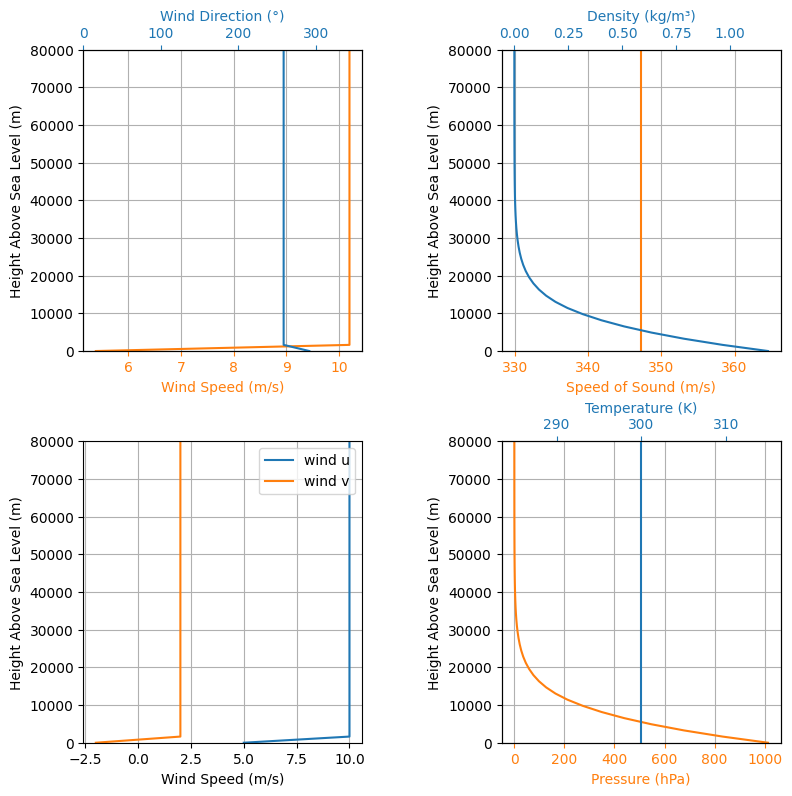
env_custom_atm.plots.atmospheric_model()
Tip
Keep in mind that importing .csv files for custom atmospheres is also possible. See Loading data from a .csv file for more information.
Leaving the pressure field as None means we want the International Standard
Atmosphere’s pressure profile to be used.
We could have done the same with temperature, but to showcase how floats can be
used, we set the temperature field as a constant 300 K profile.
For the wind, we need to specify its value in both U (east) and V (north) directions. In this case, we used arrays to specify points. Consider a wind U profile of 5 m/s at 0 m and 10 m/s at 1000 m. For the wind V, we used -2 m/s at 0 m, 3 m/s at 500 m and 2 m/s at 1000 m.
Tip
You could also use a rocketpy.Function() object to define the any of these profiles.