
Tanks Usage#
Tanks can be added to Hybrids and Liquids motors so that the propellant’s time varying properties can be properly calculated. To do this the tank must be first separately defined.
A few different types of tanks are available. These are simply different ways of defining a the propellant flow given different information. The different types of tanks are:
class MassFlowRateBasedTank: flow is described by mass flow rate. See Mass Flow Rate Based Tank for more information.class MassBasedTank: flow is described by liquid and gas masses. See Mass Based Tank for more information.class LevelBasedTank: flow is described by liquid level. See Level Based Tank for more information.class UllageBasedTank: flow is described by ullage. See Ullage Based Tank for more information.
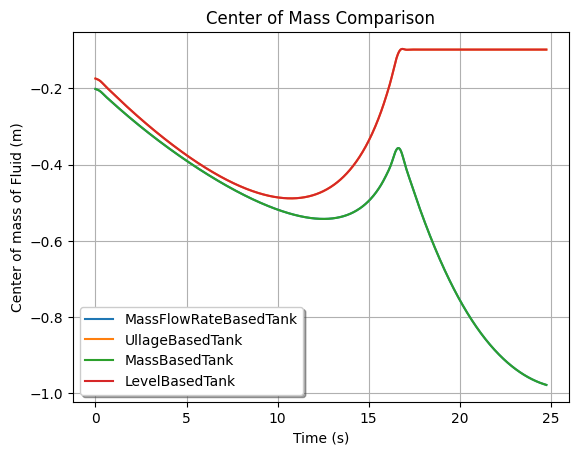
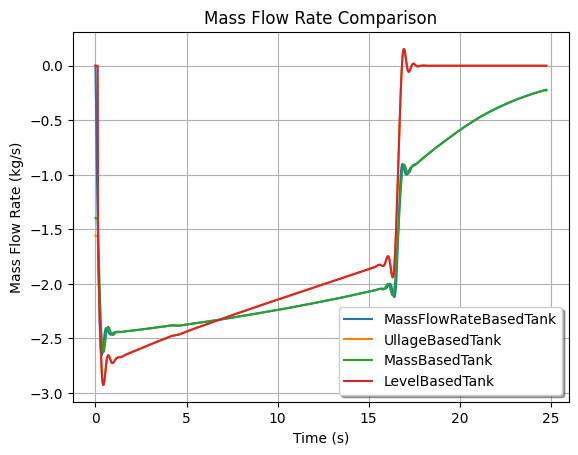
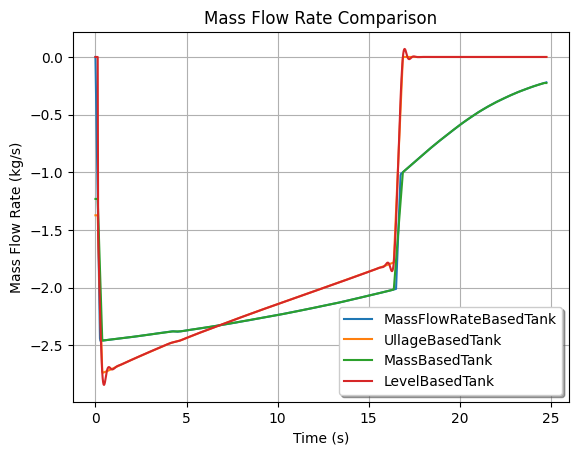
To summarize, the UllageBasedTank and LevelBasedTank are less accurate
than the MassFlowRateBasedTank and MassBasedTank, since they assume
uniform gas distribution filling all the portion that is not occupied by liquid.
Therefore, these tanks can only model the tank state until the liquid runs out.
Tanks also must receive a TankGeometry object which describes the tank’s
geometry. This object is defined in the Tank Geometry section.
Finally, tanks must be given a Fluid object which describes the propellant
in the tank. This object is defined in the Fluid section.
See also
Tanks are added to motors using the add_tank method of the motor. You can
find more information about this method in the
Adding Tanks section.
Attention
As always with rocketpy, the units of the density are in accordance with the International System of Units (SI).
Fluid#
Fluid are a very simple class which describes the properties of a fluid. They are used to define the propellant in a tank. A Fluid is defined by its name and density as such:
liquid_N2O = Fluid(name="Liquid Nitrous Oxide", density=855)
vapour_N2O = Fluid(name="Vapour Nitrous Oxide", density=101)
Fluid are then passed to tanks when they are defined.
Note
One may define the fluid density as a function of temperature (K) and pressure (Pa). The data can be imported from an external source, such as a dataset or external libraries. In this case, the fluid would be defined as such:
>>> Fluid(name="N2O", density=lambda t, p: 44 * p / (8.314 * t))
>>> from CoolProp.CoolProp import PropsSI # external library
>>> Fluid(name="N2O", density=lambda t, p: PropsSI('D', 'T', t, 'P', p, 'N2O'))
In fact, the density parameter can be any Function source, such as a
callable, csv file or an array of points. See more on
rocketpy.Function.
Tank Geometry#
When defining a tank, its geometry must be specified. The geometry can be defined in two ways:
Using the predefined
CylindricalTankandSphericalTankclasses.Using the
TankGeometryclass to input a custom geometry.
Cylindrical and Spherical Tanks#
The predefined CylindricalTank class is easy to use and is defined as such:
cylindrical_geometry = CylindricalTank(radius_function=0.1, height=2.0, spherical_caps=False)
Deprecated since version 1.13.0: The radius keyword argument of CylindricalTank and SphericalTank
has been renamed to radius_function. Passing radius= still works but
now raises a DeprecationWarning and will be removed in v2.0.0. Use
radius_function= instead (it accepts the same constant radius value).
Note
The spherical_caps parameter is optional and defaults to False. If set
to True, the tank will have spherical caps at the top and bottom with the
same radius as the cylindrical part. If set to False, the tank will
be defined as a cylinder with flat caps.
The predefined SphericalTank is defined with:
spherical_geometry = SphericalTank(radius_function=0.1)
See also
rocketpy.CylindricalTank and rocketpy.SphericalTank
for more information on these parameters.
Custom Tank Geometry#
The TankGeometry class can be used to define a custom geometry by passing
the geometry_dict parameter, which is a dictionary with its keys as tuples
containing the lower and upper bound of the tank, while the values correspond
to the radius function of that section of the tank.
To exemplify, lets define a cylindrical tank with the same dimensions as the
CylindricalTank example above:
custom_geometry = TankGeometry(
    geometry_dict={
        (-1, 1): lambda x: 0.1,
    }
)
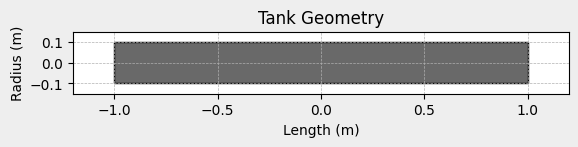
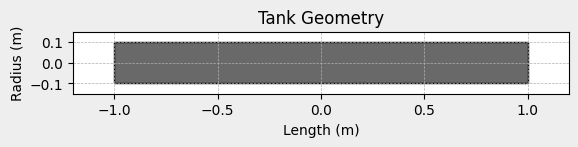
This defines a cylindrical tank with a 2 m lengths (from -1 m to 1 m) and a constant radius of 0.1 m.
Note
The center of coordinate is always at the exact geometrical center of the tank.
We can also define a tank with a parabolic cross-section by using a variable radius, for example:
custom_geometry = TankGeometry(
    geometry_dict={
        (-1, 1): lambda x: 0.1*x**2,
    }
)
Mass Flow Rate Based Tank#
A MassFlowRateBasedTank has its flow described by the variation of liquid
and gas masses through time and is defined as such:
N2O_flow_tank = MassFlowRateBasedTank(
    name="MassFlowRateBasedTank",
    geometry=cylindrical_geometry,
    flux_time=24.750,
    liquid=liquid_N2O,
    gas=vapour_N2O,
    initial_liquid_mass=42.8,
    initial_gas_mass=0.1,
    liquid_mass_flow_rate_in=0,
    liquid_mass_flow_rate_out="../data/motors/liquid_motor_example/liquid_mass_flow_out.csv",
    gas_mass_flow_rate_in=0,
    gas_mass_flow_rate_out="../data/motors/liquid_motor_example/gas_mass_flow_out.csv",
    discretize=100,
)
Important
Pay special attention to the flux_time, liquid_mass_flow_rate_in,
liquid_mass_flow_rate_out, gas_mass_flow_rate_in and
gas_mass_flow_rate_out parameters.
More details can be found in rocketpy.MassFlowRateBasedTank.__init__.
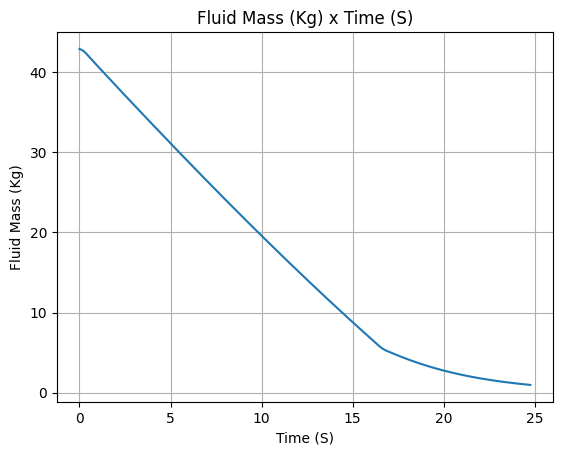
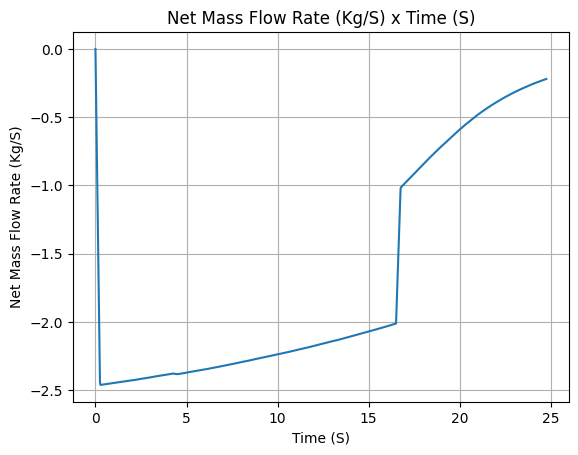
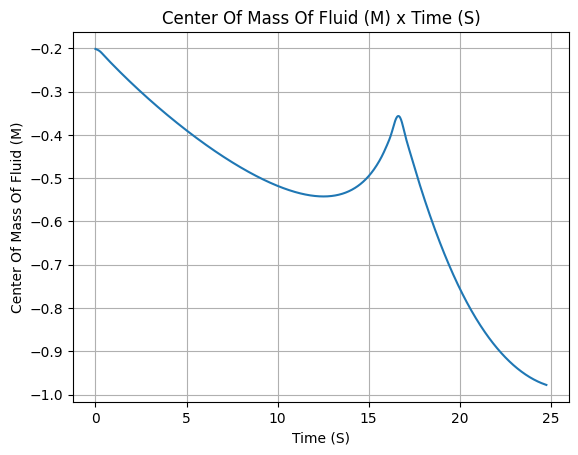
We can see some useful plots with:
# Draw the tank
N2O_flow_tank.draw()
# Evolution of the Propellant Mass and the Mass flow rate
N2O_flow_tank.fluid_mass.plot()
N2O_flow_tank.net_mass_flow_rate.plot()
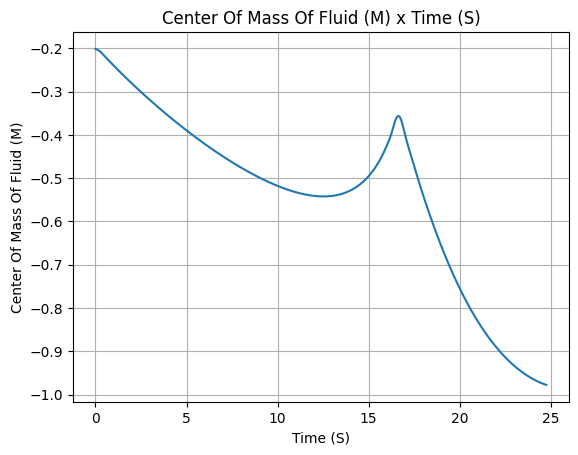
# Evolution of the Propellant center of mass position
N2O_flow_tank.center_of_mass.plot()
Mass Based Tank#
A MassBasedTank has its flow described by the variation of liquid and gas
masses through time. To define it, lets get the liquid and gas masses from the
MassFlowRateBasedTank we defined above:
gas_mass = N2O_flow_tank.gas_mass
liquid_mass = N2O_flow_tank.liquid_mass
Then we can define the MassBasedTank as such:
N2O_mass_tank = MassBasedTank(
    name = "MassBasedTank",
    geometry = cylindrical_geometry,
    flux_time = 24.750,
    gas = vapour_N2O,
    liquid = liquid_N2O,
    gas_mass = gas_mass,
    liquid_mass = liquid_mass,
    discretize=100,
)
Important
Pay special attention to the flux_time, gas_mass and liquid_mass
parameters.
More details can be found in rocketpy.MassBasedTank.__init__.
We can see some outputs with:
# Draw the tank
N2O_mass_tank.draw()
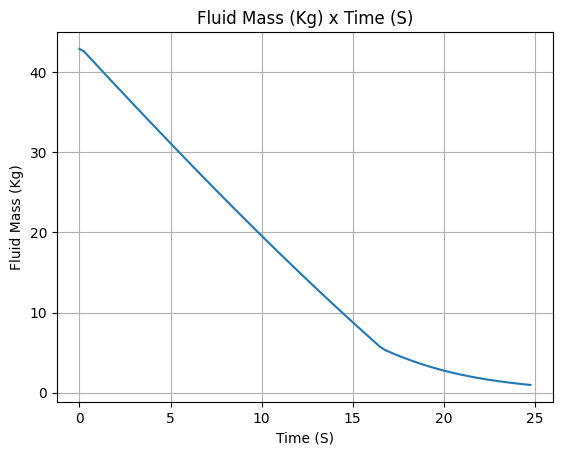
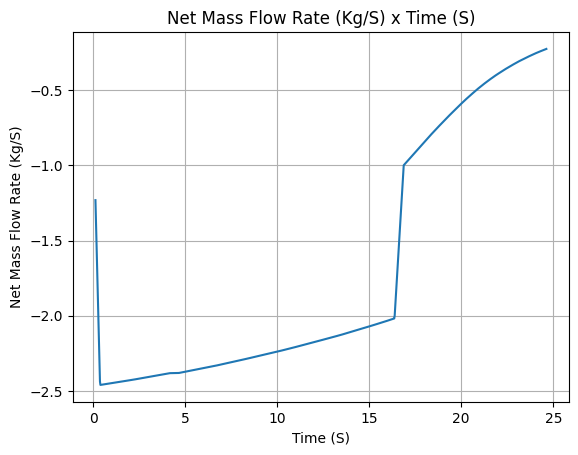
# Evolution of the Propellant Mass and the Mass flow rate
N2O_mass_tank.fluid_mass.plot()
N2O_mass_tank.net_mass_flow_rate.plot()
# Evolution of the Propellant center of mass position
N2O_mass_tank.center_of_mass.plot()
All tank types now include a built-in method for animating the evolution
of liquid and gas volumes over time. This visualization aids in understanding the dynamic behavior
of the tank’s contents. To animate the tanks, we can use the
animate_fluid_volume() method from the tank’s plotter:
N2O_mass_tank.plots.animate_fluid_volume(fps=30)
<matplotlib.animation.FuncAnimation at 0x76fd499bed20>
Optionally, the animation can be saved to a GIF file:
N2O_mass_tank.plots.animate_fluid_volume(fps=30, filename="mass_based_tank.gif")
<matplotlib.animation.FuncAnimation at 0x76fd49b3c3e0>
Ullage Based Tank#
An UllageBasedTank has its flow described by the ullage volume, i.e.,
the volume of the tank that is not occupied by the liquid. It assumes that
the ullage volume is uniformly filled by the gas.
To define it, lets first calculate the ullage volume by using the
MassFlowRateBasedTank we defined above:
tank_volume = cylindrical_geometry.total_volume
ullage = (-1 * N2O_flow_tank.liquid_volume) + tank_volume
Then we can define the UllageBasedTank as such:
N2O_ullage_tank = UllageBasedTank(
    name="UllageBasedTank",
    geometry=cylindrical_geometry,
    flux_time=24.750,
    gas=vapour_N2O,
    liquid=liquid_N2O,
    ullage=ullage,
    discretize=100,
)
Important
Pay special attention to the flux_time and ullage parameters.
More details can be found in rocketpy.UllageBasedTank.__init__.
We can see some outputs with:
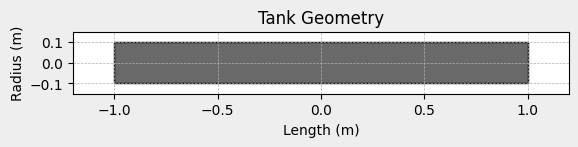
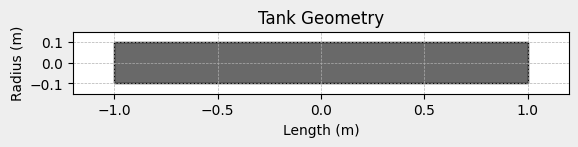
# Draw the tank
N2O_ullage_tank.draw()
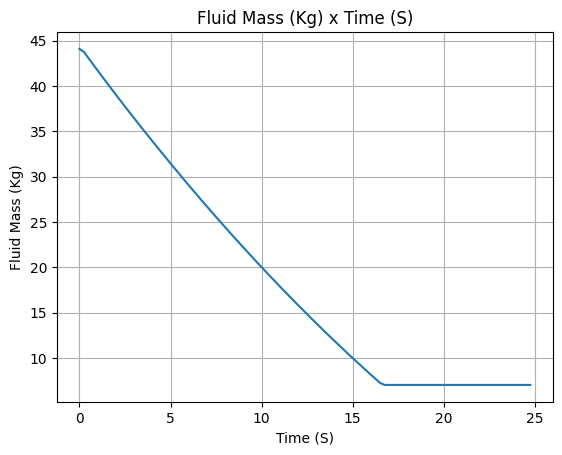
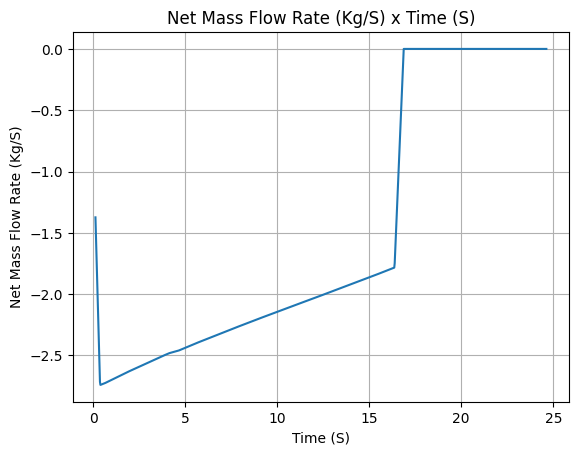
# Evolution of the Propellant Mass and the Mass flow rate
N2O_ullage_tank.fluid_mass.plot()
N2O_ullage_tank.net_mass_flow_rate.plot()
# Evolution of the Propellant center of mass position
N2O_ullage_tank.center_of_mass.plot()
Level Based Tank#
A LevelBasedTank has its flow described by liquid level, i.e.,
the height of the liquid inside the tank. It assumes that the volume
above the liquid level is uniformly occupied by gas.
To define it, lets first calculate the liquid height by using the
MassFlowRateBasedTank we defined above:
liquid_height = N2O_flow_tank.liquid_height
Then we can define the LevelBasedTank as such:
N20_level_tank = LevelBasedTank(
    name="LevelBasedTank",
    geometry=cylindrical_geometry,
    flux_time=24.750,
    liquid=liquid_N2O,
    gas=vapour_N2O,
    liquid_height=liquid_height,
    discretize=100,
)
Important
Pay special attention to the flux_time and liquid_height parameters.
More details can be found in rocketpy.LevelBasedTank.__init__.
We can see some outputs with:
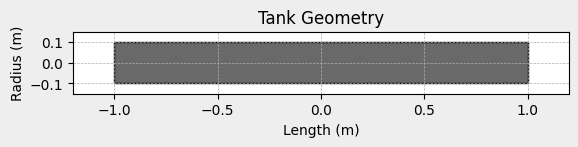
# Draw the tank
N20_level_tank.draw()
# Evolution of the Propellant Mass and the Mass flow rate
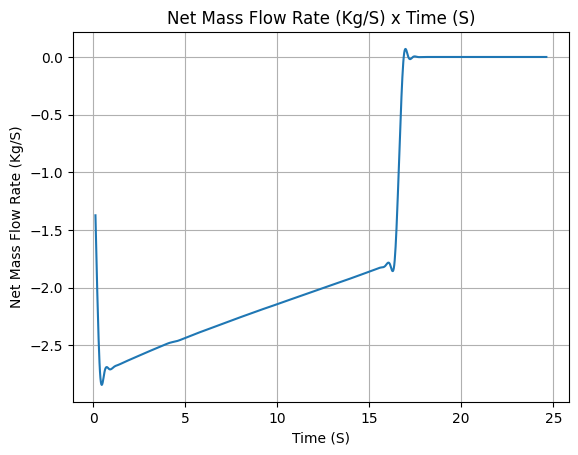
N20_level_tank.fluid_mass.plot()
N20_level_tank.net_mass_flow_rate.plot()
# Evolution of the Propellant center of mass position
N20_level_tank.center_of_mass.plot()
Comparing Tanks#
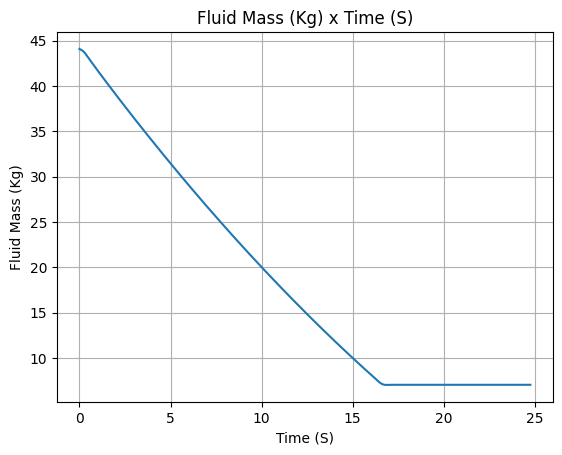
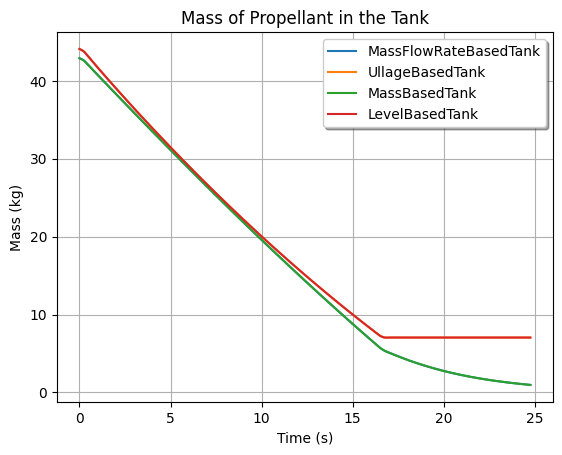
Now that we saw the different methods to calculate the mass flow rate, we can compare the results all together.
tanks = [N2O_flow_tank, N2O_ullage_tank, N2O_mass_tank, N20_level_tank]
# Mass
Function.compare_plots(
    plot_list=[(tank.fluid_mass, tank.name) for tank in tanks],
    lower=0,
    upper=24.750,
    title="Mass of Propellant in the Tank",
    xlabel="Time (s)",
    ylabel="Mass (kg)",
)
# Mass flow rate
Function.compare_plots(
    plot_list=[(tank.net_mass_flow_rate, tank.name) for tank in tanks],
    lower=0,
    upper=24.750,
    title="Mass Flow Rate Comparison",
    xlabel="Time (s)",
    ylabel="Mass Flow Rate (kg/s)",
)
# Center of mass
Function.compare_plots(
    plot_list=[(tank.center_of_mass, tank.name) for tank in tanks],
    lower=0,
    upper=24.750,
    title="Center of Mass Comparison",
    xlabel="Time (s)",
    ylabel="Center of mass of Fluid (m)",
)